
What a stranger needs to know, one tap away.
A MedTag is a small keychain tag for anyone with a medical condition. Whoever is helping can tap it with their phone and see how to communicate with the owner, what they take, what they're allergic to, and who to call.
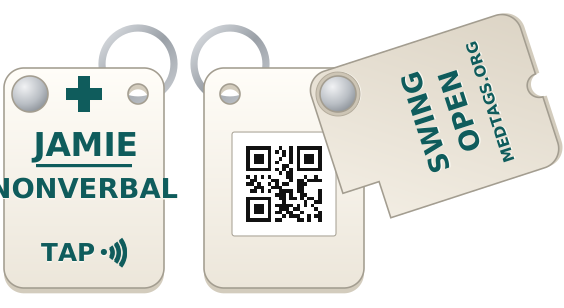
Helping someone who has a MedTag? Hold your phone against the front of the tag, where it says TAP, or scan the QR code on the back with your camera; on some tags it is under a lid that swings open. No app is needed. In an emergency, call 911 first.
For any condition that matters in an emergency
Medical ID jewelry has room for a word or two. A MedTag links to a whole page that its owner writes and keeps up to date, so it can say exactly what helps.
- Long-term conditions
- Diabetes, epilepsy, heart conditions, asthma. Say what a low blood sugar or a seizure looks like, and what to do.
- Communication and memory
- Autism, nonverbal, deaf or hard of hearing, dementia. Tell people how to approach, and help someone who is lost get home.
- Allergies and medications
- Severe allergies and whether there's an auto-injector on hand, blood thinners, insulin, a pacemaker.
- Families and caregivers
- One account can look after several tags, so a parent or caregiver keeps everyone's page current in one place.
How it works
The tag holds only a permanent web address. Everything else lives online, so the tag never needs replacing when something changes.
Ask for a tag
It comes with a claim card: a card with a one-time code that proves the tag is yours.
Set it up
Enter the tag's ID and code, confirm your email, then fill in your page and choose which details show.
Keep it current
New medication or phone number? Sign in with your email and save. We'll email you every six months to check, and your account shows when the tag was last opened.
A page built for the worst moment
Whoever scans the tag gets a plain page that opens fast, even on a weak signal, with no app and no sign-in.
- Urgent things firstName and age, how to communicate, allergies.
- One tap to callA large Call 911 button, then what to do, and emergency contacts that dial straight away.
- The details belowConditions, medications, doctor and notes, with the date they were last updated.
MedTags · Emergency information
Jamie
Age 9
Communication
Allergies
What to do
Emergency contacts
Medical conditions
Small, and no battery
Each tag is 3D printed with a tap-to-read chip sealed inside. The front carries the owner's name and a short note, like NONVERBAL or DIABETIC, so it helps before anyone takes out a phone, and a TAP mark that shows where to hold one.
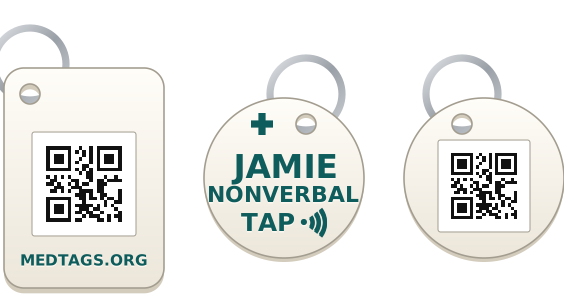
- Designs
- Three shapes: a flat 40 × 55 mm tag with the QR code open on its back; the same tag with a swing-open lid that keeps the code clean and out of sight; or a 40 mm disc, the smallest. The flat tag and the disc can also be made tap-only, with no code on them.
- Size
- 40 × 55 mm and 4 mm thick, 7 mm with the lid. The disc is 40 mm across and 3 mm thick. All go on a key ring.
- Tap
- An NFC chip, the same tap-to-read technology as contactless cards, opens the page when a phone touches the front. It's locked, so no one can rewrite it.
- Scan
- A QR code on the back, for phones that can't tap. It opens the same page as the chip, and the owner's sheet and wallet card carry it too.
- Power
- None. Nothing to charge or replace.
- Card
- Print a matching wallet card from your account, with the same QR code, for a wallet or backpack.
Privacy
You decide, field by field, what a stranger sees when your tag is scanned. Hidden details never leave the server, tag pages stay out of search engines, and there are no ads, analytics or trackers.
Questions
What happens if I lose my tag?
Sign in and turn the tag off. Anyone who scans it then sees "Tag not active" and none of your information. You can turn it back on if it turns up.
What if nobody thinks to check the tag?
The front shows the owner's name and a short note, so it's noticeable at a glance. It also helps to tell the people you spend time with that you carry one.
Can I manage tags for my children or someone I care for?
Yes. One account can own several tags, each with its own page.
Can I get a tag for my dog or cat?
Yes. A pet tag goes on the collar, with a paw on the front instead of the plus, and its page is written for whoever finds the animal: who to call, how to approach it, medical needs, the vet and the microchip number. If your pet goes missing, switch on the lost notice and the page says so at the top. Ask for one through the contact form.
Is the information checked by a doctor?
No. Each page is written by the tag's owner, and MedTags doesn't verify it. Keep it accurate and up to date, and in an emergency always call 911.
Should I also set up my phone's medical ID?
Yes. Paramedics check a phone's lock screen, and your tag covers the times your phone is dead or out of reach. Here's how to set it up on iPhone and Android.
How do I change what's on my page?
Sign in with your email, edit any field and save. A preview shows exactly what someone scanning the tag will see.
Ask for a tag
MedTags is a small personal project, and tags are made by hand for family and friends. Send a message to ask for one, or with any question, and we'll reply by email.
Already have a tag? Set it up with your claim card